
需求:自动删除Mail下的NSF文件
思路:先遍历扫描服务器SVR1/ACME上所有的NSF,匹配到路径包含MAIL\之后,用MarkForDelete方法删除。
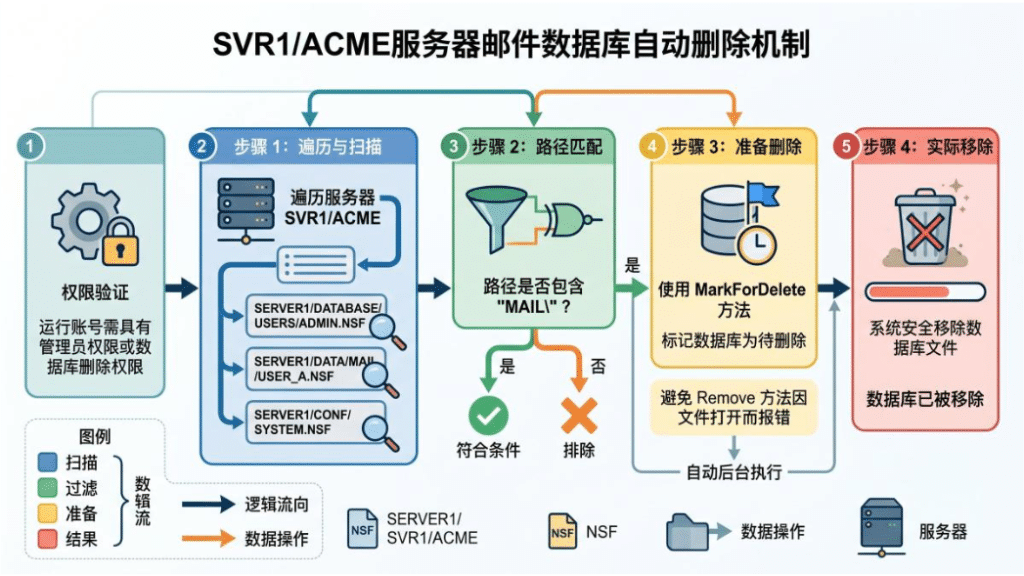
注意:运行这个代码的账号通常需要管理员权限或数据库删除权限,不能用Remove方法,否则会因为数据库正在打开而报错
05/01/2026 01:57:28 AM Agent Manager: Agent printing: Match Found – Attempting removal: mail\test20260501.nsf
05/01/2026 01:57:28 AM Agent Manager: Agent ‘autodel’ error: Database mail/test20260501.nsf could not be deleted
步骤:
1.创建代理autodel
2.代理属性-基本,定时执行设为:每天多次,目标设为:无,日程安排:每30分钟执行一次
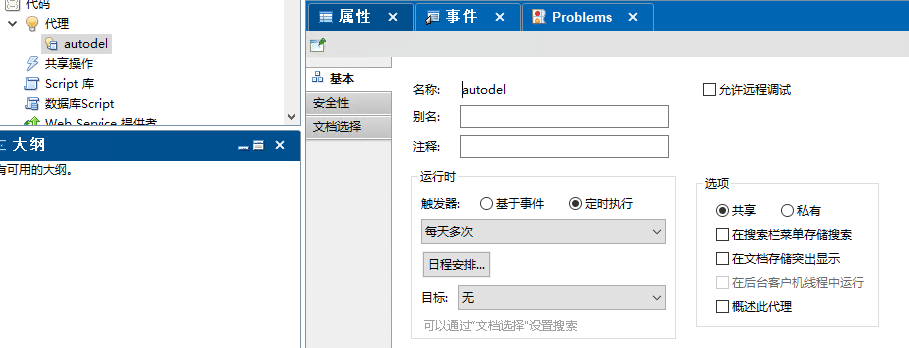
3. 用Server的ID对其进行签名
4. 粘贴代码如下:
Sub Initialize
    Dim session As New NotesSession
    Dim dbDir As NotesDbDirectory
    Dim db As NotesDatabase
    Dim serverName As String

    serverName = "SVR1/ACME"
    ' Get the directory object for the specified server
    Set dbDir = session.GetDbDirectory(serverName)

    ' Start with the first database file on the server (1247 = DATABASE)
    Set db = dbDir.GetFirstDatabase(1247)

	While Not (db Is Nothing)
		' 打印当前检查的路径,确认数据库是否存在
		Print "Checking: " & db.FilePath
		If InStr(UCase(db.FilePath), "MAIL\") = 1 Then
			Print "Match Found - Attempting removal: " & db.FilePath
			Call db.MarkForDelete() ' 先确认匹配,再取消注释
		End If
		Set db = dbDir.GetNextDatabase()
	Wend

    Print "Scan complete."
End Sub
手工执行:
tell amgr run delnsf.nsf 'autodel'
执行结果:在log.nsf会写入
05/07/2026 12:44:29 AM  AMgr: Agent ('autodel' in 'delnsf.nsf') printing: Match Found - Attempting removal: mail\dong123.nsf
05/07/2026 12:44:29 AM  AMgr: Agent ('autodel' in 'delnsf.nsf') printing: Scan complete.
05/07/2026 12:44:29 AM  Opened session for SVR1/ACME (Release 12.0.2FP5)
05/07/2026 12:44:29 AM  Database mail/dong123.nsf deleted by SVR1/ACME
